Finding their way
Maps to get to school, a friend's house or the right bus — the everyday independence that a basic phone can't give them.

Tethar keeps your child's Android phone safe while it still feels like a regular smartphone. Join the waitlist for early access and a founding‑member 45‑day free trial.
parents already on the waitlist
First 500 parents get the founding offer · No spam — one email at launch.
You're on the list — your founding 45‑day free trial is reserved.
We launch this autumn. We'll email you when your early access is ready — nothing in between but the occasional build update.
Tell a parent friend on WhatsAppDesigned around the standards families trust
Children don't want to be cut off from their friends and the world — and they shouldn't have to be. A smartphone is how they find their way, look things up and learn. The goal isn't to take that away; it's to give them today's world while keeping them safe in it.
Just a few examples of the apps and everyday functionality a modern phone gives a child — the very things an older "brick" phone simply doesn't have:
Maps to get to school, a friend's house or the right bus — the everyday independence that a basic phone can't give them.
Homework, curiosity, keeping up with the world — a safely filtered web is one of the main ways children learn today.
Educational apps like Duolingo, reading and revision tools — the good things a locked‑down phone would shut out along with the bad.
A basic "brick" phone keeps children safe by cutting them off. Tethar does the opposite: it keeps everything good about a modern smartphone, and quietly removes what isn't — so the balance tips towards access and safety, not one at the cost of the other.
Seven thoughtfully-built tools that work quietly in the background — no red flags on the phone, no awkward conversations.
Most important of all: the phone looks, feels and behaves like a regular smartphone — fully customisable just like normal. They won’t really notice that it is there when using it.
Set daily limits and app-specific schedules. Wind-down for bedtime, focus hours for school — all customisable per child.
Keeps adult, gambling and other unsafe sites off‑limits through the dedicated Tethar browser — with only the sites you allow and trust let through.
Only pre-approved apps run. When your child wants something new, they send a request — you approve or decline in a tap.
Know where they are, with a gentle alert when they reach or leave the places that matter if you want it — school, home or any other place that matters to you.
A tailored digest of usage across web activity, search terms, call history, SMS content and geographic locations — insight without surveillance, so you can start the right conversations if you need to.
Manage every child from one dashboard and share access with a co-parent or more, so you're always on the same page.
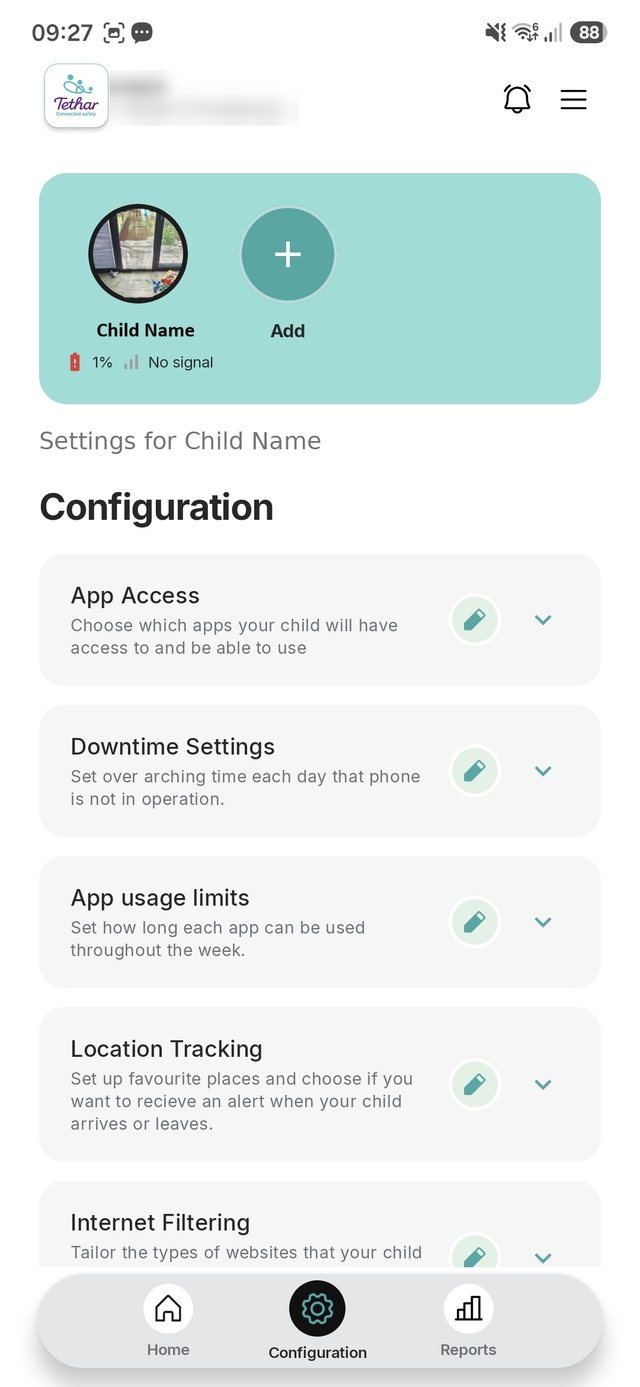
Walk through the real app at your own pace — the home dashboard, app access, downtime, time limits, safe places, internet filtering and more.
Tethar isn't one app — it's two that pair securely. You install the parent app on your phone to set the boundaries and see the week; the child app lives on your child's phone and quietly keeps it safe. One parent app connects the whole family.
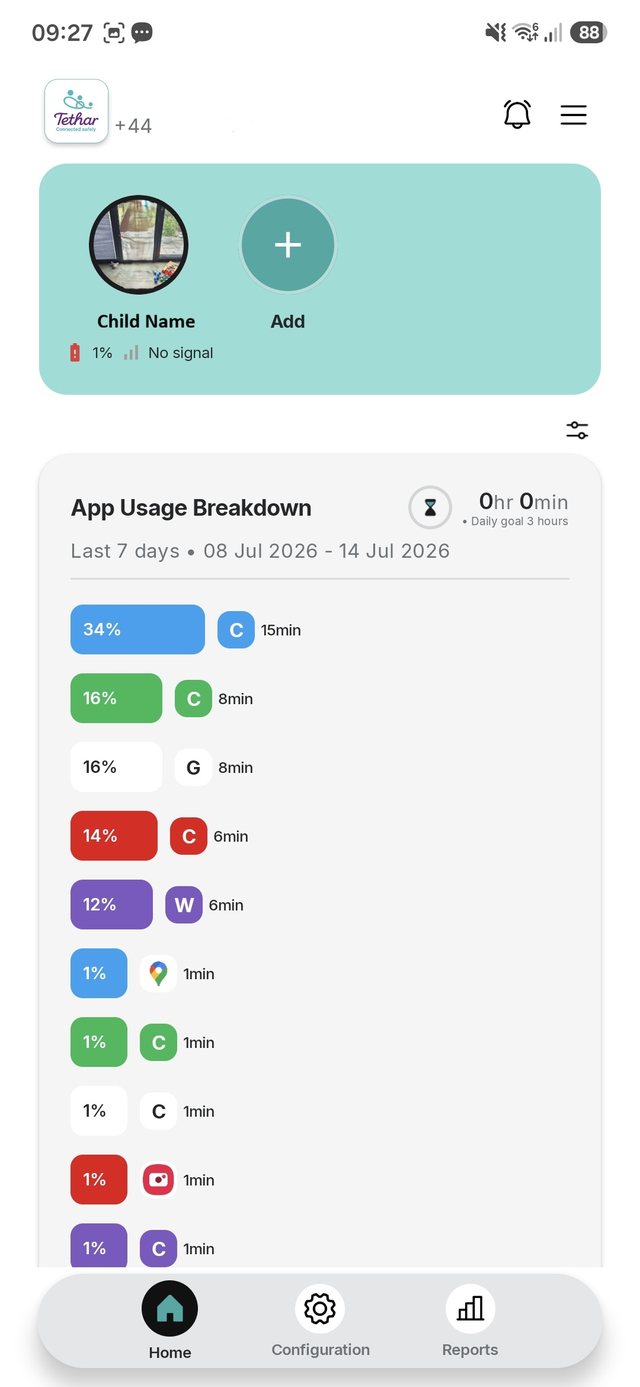
Your calm home base. One parent app connects to every child — set the boundaries, approve requests and see usage and location history at a glance, with multiple parent logins so the whole family stays in the loop.
The child app lives on your child's phone in the background and quietly keeps it safe — while the phone still looks and feels like a regular smartphone. Unlike other parental controls, there are no apps covered in padlocks and no locked‑off screens that single your child out or leave them frustrated. It just feels like a normal phone.
Download the Tethar child app from Google Play onto your child's phone and follow the on-screen setup — about four minutes.
Download the Tethar parent app from Google Play onto your own phone and add a new child.
One parent app links to multiple children's phones — and other parents can join the family too, to set the boundaries and stay across your children's week together.
Config is easy to tweak whenever you need — adjust limits, apps and filters in a few taps to adapt to your child as they grow.
Both apps download free from Google Play. Your first 30 days are free — billing begins on day 31 via Google Play (£5 a month or £47.50 a year), and you can cancel any time in two taps.
No two children are the same — and none stay the same for long. Tethar is tuned to each child on their own terms, and eases off as they get older and earn more freedom. One app that suits a cautious first phone at eight and a trusted teenager at fifteen.
Dial protection right up for a younger child's first phone, and ease it back as trust is earned. You decide how much — it's never all-or-nothing.
Screen time, apps, web filtering, downtime and safe places are set for each child individually — so siblings of different ages are never treated the same.
As they grow, or as trust builds, adjust any boundary in a tap. The phone grows up with them — you're not starting over every year.
We built Tethar because, as parents, we're aware of the dangers of smartphones and social media. Once children see something online, they cannot unsee it. We looked around for a tool that would keep our children safe and couldn't find anything that worked in the background while keeping the look and feel of a regular phone. Tethar protects in the background — the phone stays theirs, the reassurance stays yours.
Join the waitlist to lock in a founding‑member 45‑day free trial — plus early access and a say in the roadmap. We'll email you the moment Tethar opens.
parents already on the waitlist
First 500 parents get the founding offer · No spam — one email at launch · Unsubscribe anytime.
You're on the list — your founding 45‑day free trial is reserved.
We launch this autumn. We'll email you when your early access is ready — nothing in between but the occasional build update.
Tell a parent friend on WhatsAppFounding 45‑day free trial for waitlist members
Join the waitlist